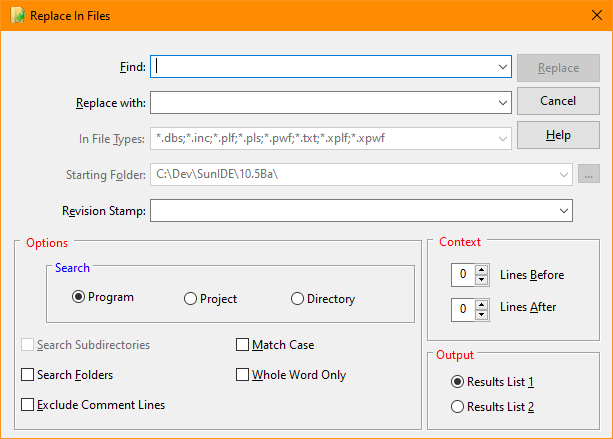
Replace in Files (Edit Menu)
The Replace in Files selection of the Edit menu searches for specified text in matching source files in the program, project, or directory specified and updates it with a new value. The results of the replacement are displayed in the selected output Find/Replace Window.
Replace in Files Dialog Items
Type or insert the information you want to find.
Type or insert the information you want to substitute.
Specifies the names and extensions of source files to search. Multiple specifications are delimited with a semi-colon or a comma (i.e., *.jpg;*.gif,*.bmp). When searching the current program or project, this field is disabled
Identifies the directory containing the files to be searched. This field is only active if the search type is "Directory".
Allows use and specification of a user defined revision string mask. The mask may contain the following characters:
|
Mask |
Meaning |
|
%H |
Hour |
|
%N |
Minute |
|
%S |
Second |
|
%D |
Day |
|
%M |
Month number |
|
%MM |
Month abbreviation (three letters) |
|
%Y |
Four digit year. |
|
%YY |
Two digit year. |
Example masks:
%H:%N:%S %M/%D/%Y
%D.%MM.%YY
%MM.%D.%Y
The date mask also supports special commands to control the position if the inserted text:
|
Command |
Meaning |
|
<Cnn> |
Column designation where nn is the column the stamp will be inserted. If no column is specified, the stamp will be inserted at the end of current line with a leading space. |
|
<Rnn> |
Ignored. The stamp will always be placed on the line with a replacement. |
Example
<C65>// 10.5 BK %M.%D.%YY
This string willl result in a revision stamp starting at column 65 with the text string similar to "// 10.5 BK 7.20.23" but with the current date.
Instructs the IDE to also search files in any defined project folders. This option is only enabled when doing a "Project" search.
Finds only those occurrences with the exact combination of uppercase and lowercase letters specified in the What box.
Finds occurrences of strings that are white space (line feed, tab or space) delimited.
See also: Replace, Using the Editor


 |