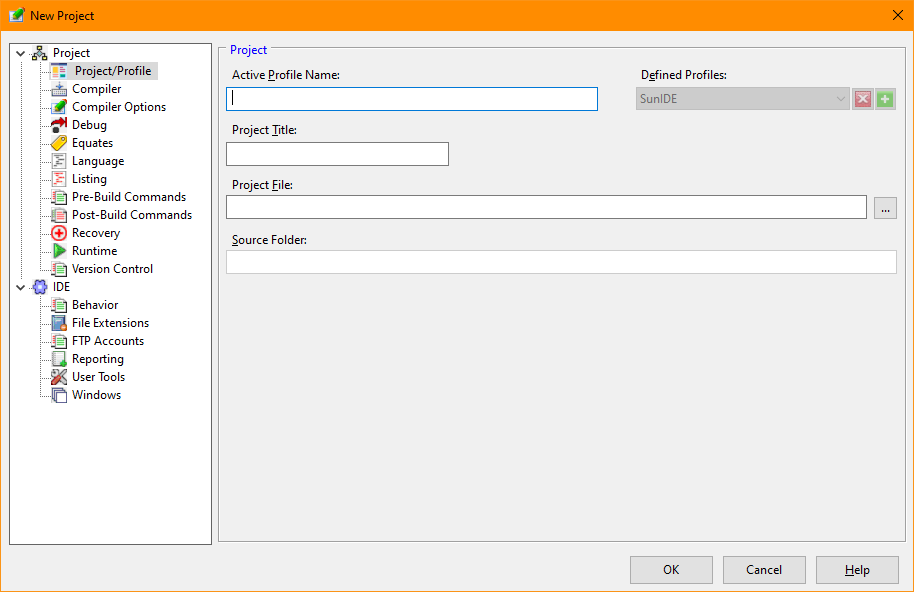
Setting Project Options
The PL/B IDE Studio allows you to customize each project by setting a number of properties. The Project Option window is shown when a new project is created or the user wishes to alter the requirements of the project The Project Options are accessible through the Project menu. Project options are saved in the project (.prj) file.
The following table describes the options available.
|
Option |
Description |
|
Project Title |
A name that is displayed for this project. |
|
Defined Profiles |
The name of profiles which are variations of the project file. For instance, a developer might have a project that contains a "debug" and a "release" profile. The "debug" profile might have options needed in the development of the application and the "release" profile could define options that are needed when the application is ready for deployment. When multiple profiles are defined, a combobox is displayed alongside the labels combobox in the toolbar section of the IDE to allow selection of the active profile. The plus icon (+) allows defining a new profile and the X icon allows deleting a profile. At least one profile is required for each project. |
|
Project File |
The name of the project file The file will have an extension of ".prj". |
|
Source Folder |
The source directory will be the default for the project's files. |
Additional option pages allow tailoring the IDE for the project or the selected profile. Most other options are not required for basic IDE operation but they will enable behaviors and appearance items that may optimize use of the IDE for the experienced developer. The additional options are defined in the Project Options topic of the Project menu.


 |