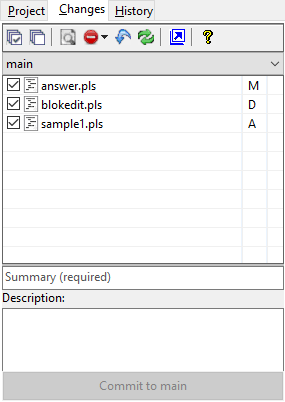
Changes Tab (Project Window)
The Changes Tab of the Project Window lists the project files added, deleted or modified since the last commit. The files are shown for the active branch and in alphabetical order with a letter indicating the type of change.
The Changes Tab toolbar buttons allow quick access to commonly needed version control functions:
|
View Changes |
This button is enabled when a file in the Modified state is selected. Clicking the button will produce a window showing the file information and the source lines differences. |
|
Ignore |
Adds the selected file, the checked files, or files with the same extension as the selected file to the Version Control ignore file. |
|
Rollback Changes |
Restores project files to the last commit state. |
|
Refresh |
Updates the Changes and History tabs with the current status |
Beneath the toolbar is a combobox that allows selection of the active branch. When changes are made to a project that has version control enabled, the changes are applied to only the active branch.
To apply the listed changes, enter a change summary, an optional description, and click the Commit button. Once the modifications are commited, the Changes screen will be blank and the History tab will contain an entry detailing the modified files.


 |