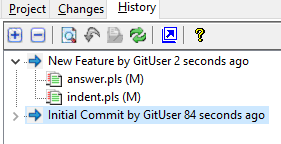
History Tab (Project Window)
The History Tab of the Project Window lists the project version control commits in descending order by date. Each commit is expandable to show the file changes and both the commit or an individual file may be viewed.
The History Tab toolbar buttons allow quick access to commonly needed version control functions:
|
View Changes |
This button is enabled when a file in the is selected. Clicking the button will produce a window showing the file information and the source lines differences. |
|
Rollback Changes |
Restores project files to the last commit state. |
|
View File |
Opens the file for editing |
|
Refresh |
Updates the Changes and History tabs with the current status |


 |