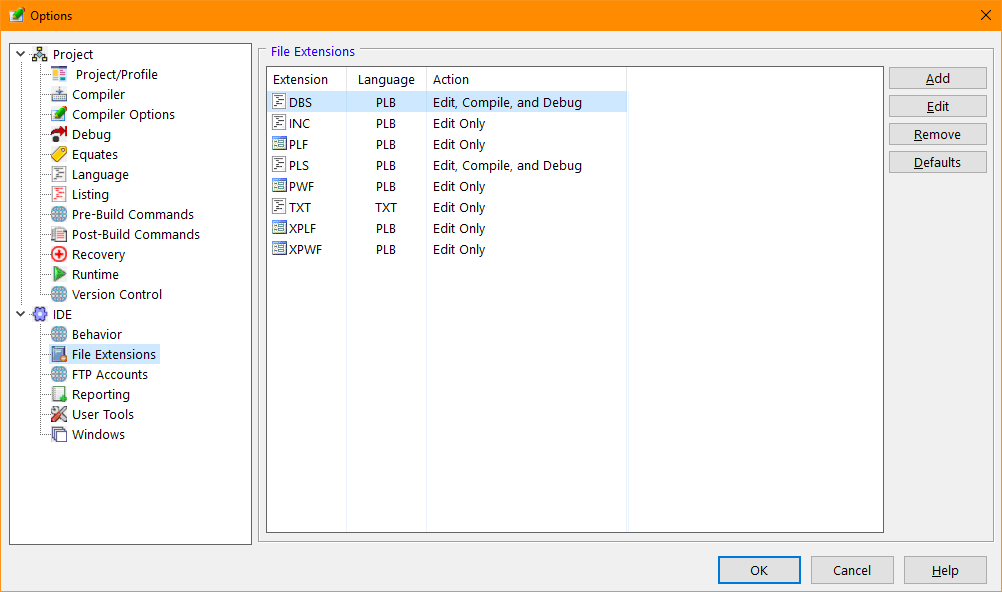
File Extensions (Tools/Options)
The File Extensions tab of the IDE Options dialog provides access to the various IDE Studio Extensions definitions. The IDE uses the extension definitions to understand how to work with various file types. By knowing that a file with a "PLF" extension is a form file, the IDE understands it should be edited using the Form Designer.
The IDE File Extensions tab shows the currenly defined defined extensions. A default list of extension is defined when the IDE is installed.
Extensions Options Dialog Items
Shows a list of the currently defined extensions.
Allows definition of a new extension.
Allows modification of a selected extension.
Removed the selected extension.
Add any of the missing IDE default extensions.
When adding or editing an extension the following dialog is displayed:
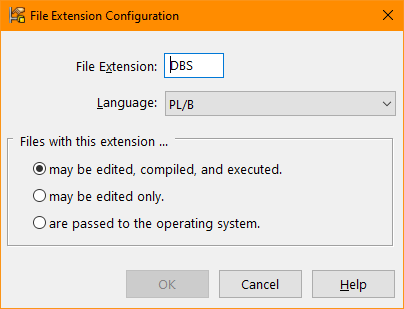
Extension Editor Dialog Items
Type the file extension being defined. A leading period (.) will be added if not specified. The extension will be stored in upper case.
The language indicator passed to the editor for color syntax highlighting.
Informs the IDE of the default action taken when the file is accessed. Typically inclusion and form files will be edit only while the program source file extensions may be edited, compiled, and executed..


 |