 Find Button
Find (Edit Menu)
Searches for specified text in the source window.
To quickly locate text in the source window, click the Find button on the toolbar or use the Alt+F3 key sequence or click the Find button in the IDE's main toolbar:
Find Button
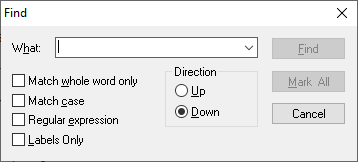
Find Dialog Items
Type or insert the information you want to find.
Finds occurrences that are words and not part of a larger word.
Finds only those occurrences with the exact combination of uppercase and lowercase letters specified in the What box.
Finds only those occurrences that match the regular expression specified in the What string. The regular expression rules are:
Wildcards: ? for any single character, + for one or more characters, * for zero or characters.
Sets of characters: Characters enclosed in square brackets will be treated as an option set. Character ranges may be specified with a (e.g. [a-c]).
Logical OR: Subexpressions may be ORed together with the | pipe symbol.
Parenthesized subexpressions: A regular expression may be enclosed within parentheses and will be treated as a unit.
Escape characters: Sequences such as \t, etc. will be substituted for an equivalent single character. \\ represents the backslash.
Finds only those occurrences that begin in column one of the editor.
Instructs Find to search in either a forward or reverse direction.
Instructs Find to bookmark all occurrences of the specified text.
See also: Replace, Using the Editor


 |