 Source Code Button
Code (Window menu)
Use the Code window to write, display and edit PL/B code. The code window allows you to select an object and an event with which to associate the code. Events that have code already associated are easily identifiable by the asterisk (*) preceding the event.
To open a Code Window from a Form Window, double-click a control or the form itself, choose Code (F3) from the View menu, press the F3 key or click on the Source Code toolbar button:
Source Code Button
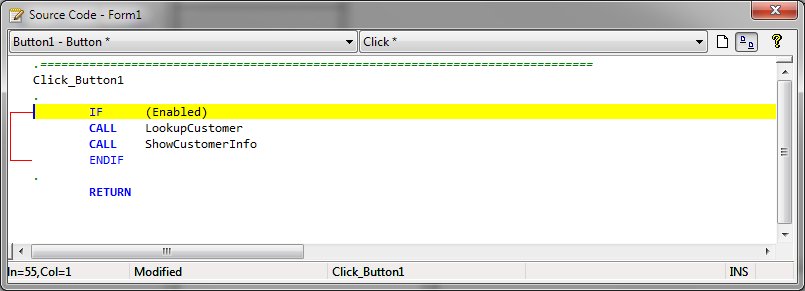
The Object Box
The Object box lists the current form and all the controls on the current form. An asterisk (*) following the object name indicates there presence of code associated with the object.
The Event Box
The Event box lists all the events recognized by the Form Designer for the form or control displayed in the Object box. An asterisk (*) following the object name indicates there presence of code associated with the object event. When you select an event, any event code associated with that event name is displayed in the bottom part of the Code window.
Mode Buttons
The mode buttons along side the event combobox allows the user to toggle between full code view and single event view. In full code view, all source code within the form is visible in the editing window. In single event mode, only the code for the selected object and event is visible.
Event Registration
When an event is generated and control is passed to the activation routine for that event, the Designer designates local variables, that contain information regarding the event being processed. These local variables are specified as:
|
Variable Name |
Value |
|
#EventType |
A FORM 4 variable that contains the event type identifier. |
|
#EventResult |
A FORM 9 variable that contains an expected result. |
|
#EventObjId |
A FORM 8 variable that contains the object identification number as defined in the Designer or CREATE statement. |
|
#EventChar |
A DIM 1 variable that may contain a character value that caused the event. If an event does not have the ability to be associated with a character value, this is blank. |
|
#EventMod |
A FORM 4 variable that contains clarification information about specific operations that occurred when the event was generated. |
If you need help on syntax for verbs, statements, properties, events, or controls while working in the Code window, highlight the keyword or the property, event, or method name, and press F1.
See also: Writing Event Code, EVENTINFO


 |