.Net Controls (Tools menu)
Adds new .Net controls to the .Net Toolbox and removes existing ones. Objects must exist in the Toolbox
before they can be added to a form. The Add .Net Control menu item displays a list of currently available
.Net Objects and allows additional controls to be referenced. Each assembly may be expanded to show its
controls. Each control may be expanded to show its suppored properties, events, and methods
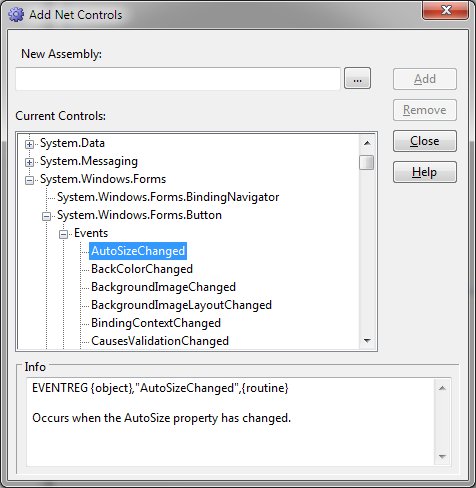
Add .Net Control Dialog Items
-
New Assembly
-
Allows specification of a new .Net assembly that will be referenced by the form. A browsing button is
provided.
-
Current Controls
-
Displays all currently registered .Net controls. The assemblies may be expanded to view the included
classes. Selection of a class allows expansion to expose the properties, events, and methods of the class.
Selection of a property, event, or class will display additional information in the Info box if available.
-
Add
-
Adds the specified assembly to the .Net Toolbox.
-
Remove
-
Removes the selected assembly from the .Net toolbox.
-
Close
-
Exits the Add .Net Controls dialog.
-
Help
-
Displays this help message.
-
Remove an added . Net control:
1. Click
the control in the Toolbox to select it.
2. Select
"Delete Control" from the Tools menu.


