Resources (Tools menu)
Allows the user to specify icons, pictures and sounds that are used by the form.
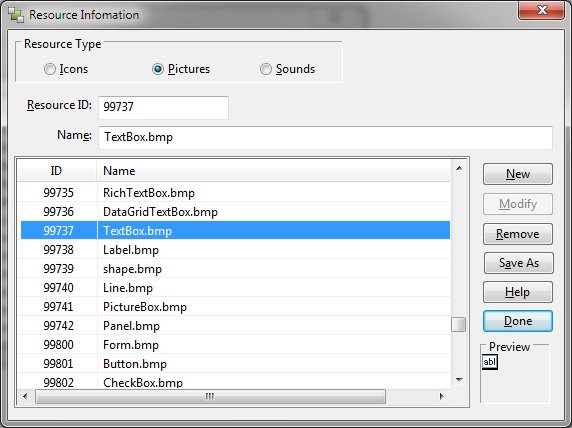
Resources Dialog Items
-
Resource Type
-
Allows selection between icons, pictures and sound. This setting alters the default file name extension
used by the New function.
-
Resource ID
-
Allows definition of the resource number. Objects use this number via the Resource ID property.
-
Name
-
Displays the name of the resource file.
-
New
-
Allows addition of a new resource. An open dialog is displayed with a default extension based
upon the Resource Type setting.
-
Modify
-
Allows changing the name or resource number of the currently selected entry.
-
Remove
-
Deletes the currently selected resource entry.
-
Save As
-
Allows the currently selected entry to be saved to disk under a new name.
-
Help
-
Displays this page.
-
Done
-
Exits the Resources dialog.
-
Preview
-
Displays the currently selected resource. For sounds, a button is displayed allowing the sound
to be played when pressed.


