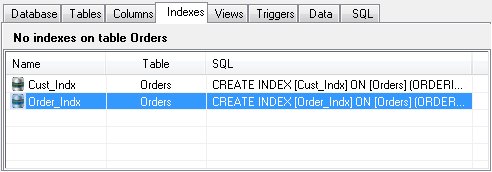
The Indexes Panel
Indexes maintain a sorting order on a column or set of columns in a table. This allows selecting a range of values without having to scan the entire table on disk. Indexes can make a huge difference in speed when a query does not need to scan the entire table.
Indexes are implemented by creating a separate index table which maps a key created from the column[s] to a row index in the indexed table. Indexes require some additional disk space and there is some slight overhead in maintaining the index but this is easily outweighed by the increased performance during queries.
SQLite automatically creates an index for every UNIQUE column, including PRIMARY KEY columns.
The Indexes Panel shows all indexes on the currently selected table, the table name, and the SQL used to create the index.
Index Addition or Edit
To add or edit an index, choose "Add" or "Edit" from the Indexes menu or from the shortcut menu. The index editor will be displayed.
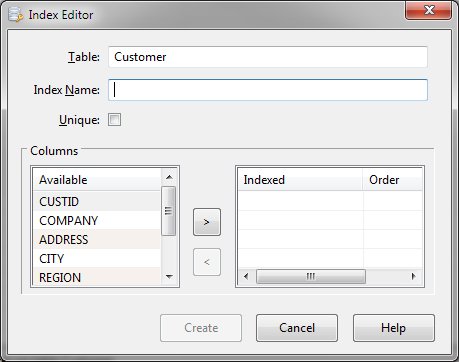
Supply a distinct name for the index and indicate whether the index values must be unique. An available list of columns is presented in the left pane. Select the column to be indexed and click the ">" button to add it to the Indexed Columns list. Multiple columns may be specified. Each column may also be defined in ascending or descending order. Click on the order value for the appropriate column and select the order desired. Once the index name and columns have been defined, click the "Create" or "Update" button.
Index Deletion
To remove an index from a table, select the index in the Indexes panel and click "Delete" from the Indexes or shortcut menu.


 |