Breakpoints (Windows Menu)
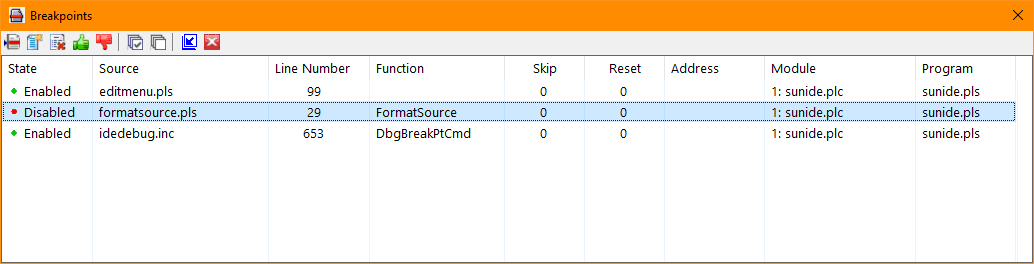
The Breakpoints selection of the Windows menu toggles the Breakpoints window or tab visiblility when configured as an independent window. The Breakpoints selection is available when editing and debugging and using the integrated version of the debugger (Tools/Options/Debug). Breakpoints are defined for a program in a project and are saved and restored when the project is closed or opened.
Clicking the Close icon (red X on the title bar) will cause the window or tab to be hidden. The Breakpoints selection of the Windows menu will restore the visibility.
The window's toolbar provides buttons to:
Position the editor to the selected breakpoint
Add a new breakpoint
Delete the selected breakpoint or breakpoints
Enable the selected breakpoint or breakpoints
Disable the selected breakpoint or breakpoints
Select all breakpoints
Clear all breakpoint selections
Promote or Demote the breakpoints to a Window or Tab
Hide the breakpoints window
Double-clicking a breakpoints entry will position the editor to the source line containing the breakpoint.


 |