Compiler (Tools/Options)
The Compiler tab of the Options dialog provides access to the PL/B compiler options and output folders.
Additional options allow conctrol of SunIDE's behavior.
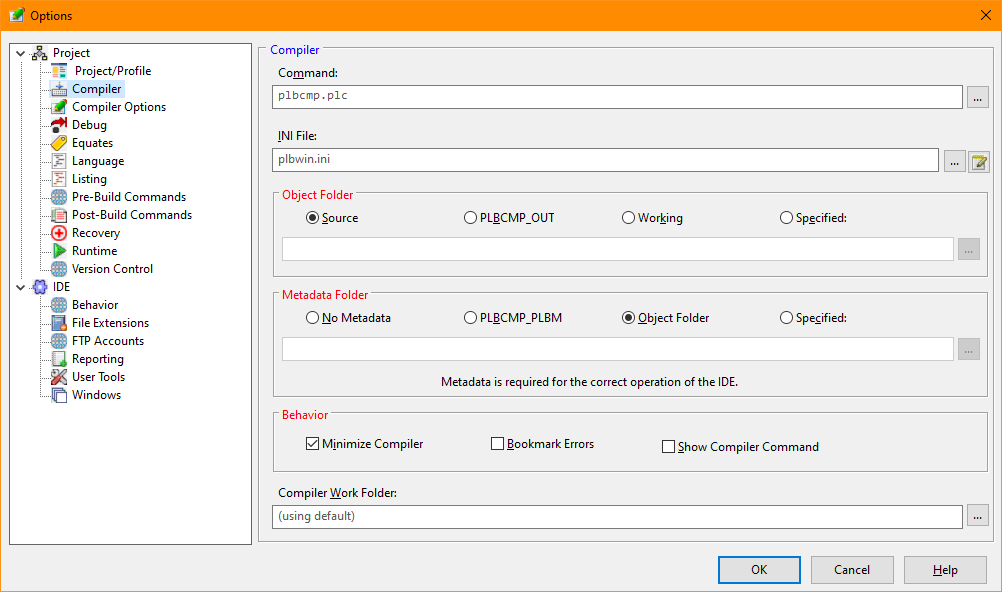
Compiler Options Dialog
-
Command
The name and location of the compiler. No runtime specification should be included. By default, the
compiler in the PLB_SYSTEM folder defined in the runtime program information file (plbwin.ini) will be
used.
-
Ini File
The name and location of the runtime's program informationI file used while compiling.
-
Object Folder
-
The folder where the compiler output will be placed.
-
Metadata Folder
-
The folder where the compiler metadata output will be placed. Metadata enables the reflection functions
used by the runtime that is generated by the compiler. Reflection reports the name and location of labels,
the name of source files and forms, and other useful information regarding the program.
-
Behavior
-
These settings control the compiler's actions:
- The Minimize
Compiler will reduce the compiler to a minimized state
- The Bookmark
Errors will clear any existing bookmarks and then add bookmarks for any error lines found during the compiler
process.
- The Show
Compiler Command will show the full command line executed to start the compiler process.
>-
Compiler Work Folder
The name and location of the compiler work files.
-


