Save File FTP (File Menu)
The Save File FTP selection of the File menu displays a dialog box where you specify the new name or directory
for the active source file on an FTP server. This function is only enabled when an FTP account is defined
in the IDE options (Tools/Options/FTP Accounts).
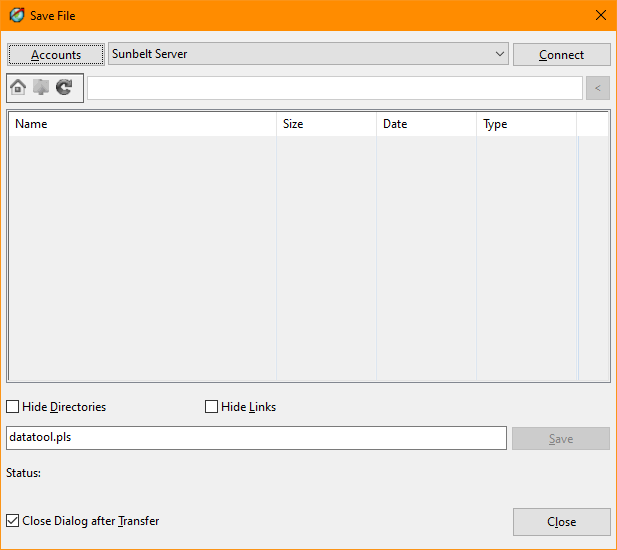
Save File FTP Dialog Items
-
Accounts
-
Provides access to the FTP account maintenance function of the Tools/Options menu.
-
Account
-
Allows selection of a defined FTP account.
-
Connect/Disconnect
-
Establishes a connection to the selected FTP account, set the initial remote directory, and displays files
and directories in the selected directory. Once connected to an FTP server, the button will change to
"Disconnect" and provide closing of the connection.
-
Home Button
-
Moves to the defined Initial Remote Directory of the FTP account.
-
Parent Button
-
Moves to the parent of the currently shown directory.
-
Refresh Button
-
Updates the list of files and directories shown in the dialog.
-
Directory
-
Allows specification of a directory on the remote FTP server.
-
Directory List
-
Shows files and optionally directories or links in the currently selected directory.
-
Hide Directories
-
Prevents directories from being shown in the dialog list.
-
Hide Links
-
Prevents links from being shown in the dialog list.
-
File Name
-
The name of the file to be created or overwritten on the server.
-
Save
-
Initiates the save process
-
Status
-
Displays status information as the file is saved.
-
Close Dialog after Transfer
-
Closes the dialog after a successful transfer.
-
Close
-
Closes the Save File FTP dialog.
See also: Close
File, Save
File, Save
All, Working
with Projects


