 New button
New File (File Menu)
Creates a new source file. To open an existing file, use the Open File command.
To quickly create a new source file, use the Ctrl+N key sequence or click the New button on the toolbar and select "New File".
New button
Once selected, the New File function will display a dialog that allow the user to define the type of file desired.
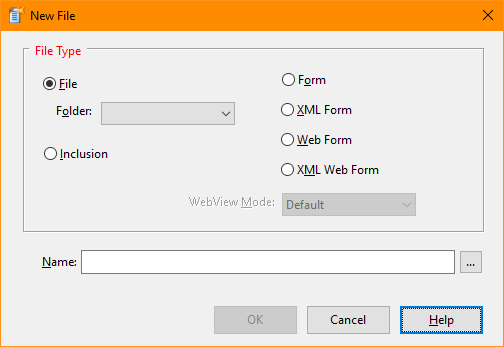
New File Dialog Items
The file type selection area allows selection from the various file formats used by the IDE:
A Program file type will create a source file and place it in the Project window. If one or more folders are defined, they user may add the file to a folder.
An Inclusion file type will simply create a new source file but it will not be added to the Project window. It is expected that the file will be included by another source file.
A Form file type will use the Form Designer to create a standard Windows form that will be saved in binary form.
An XML Form file type will use the Form Designer to create a standard Windows form that will be saved in XML format.
A Form file type will use the Form Designer to create a Web Server form that will be saved in binary form.
An XML Web Form file type will use the Form Designer to create a Web Server form that will be saved in XML format.
Select or type the name of the file you wish to create. If a file with the name already exists, you will be allowed to overwrite it.
Select the type of WebView support for a new form file. The WebView mode must be specified when the form is created and cannot be changed later.
See also: Close File, Save File, Save File As, Save All, Working with Projects


 |