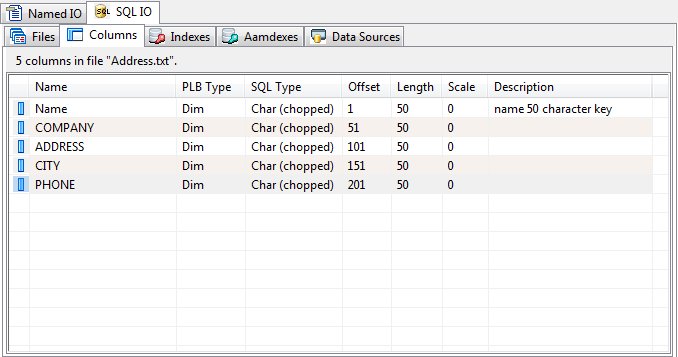
The Columns Panel (SQLIO)
The required 'sun_sqlio_columns' table within a SQLIO schema database contains all column definitions defined for all PLB files to be processed using SQLIO operations. The information contained in this table identifies the expected fields and position in a record for a data file in a PLB application. The columns defined for this system table are:
|
Column |
Use |
|
id |
This column is a unique number that identifies this column that defines the parameters to access/use a field in a file record layout. |
|
file_id |
This column is the same as the 'id' found in the 'sun_sqlio_files' table. This column associates a specific file name to this column definition that has been inserted into the 'sun_sqlio_columns' table. The SQL data type for this column is 'integer'. |
|
name |
This column contains a name for this column. The SQL data type for this column is 'text not null'. |
|
description |
This column contains text that describes the schema database column that has been specified. The SQL data type for this column is 'text'. |
|
type |
This column is a number that gives the basic PLB data type of this column field definition. The SQL data type for this column is 'integer'. The acceptable values for this column are as follows 0 - DIM variable 1 - FORM variable 2 - INTEGER variable |
|
offset |
This column is a number that gives the one relative offset in a record where the field is located. The SQL data type for this column is 'integer'. |
|
length |
This column is a number that gives the length for the field in a record. This value is the total length of the field. In the case of a FORM variable, the total length includes the whole digits, a decimal point if used, and the decimal digits to the right a decimal point if used. The SQL data type for this column is 'integer'. |
|
scale |
This column is a number that gives the number of decimal digits to the right of a decimal in a FORM variable. If this value is '-1', the FORM is to have a decimal point with no fractional digits. Otherwise, this value can be from zero to the maximum number of fractional digits allowed for a PLB FORM variable. The SQL data type for this column is 'integer'. |
|
sql_type |
Required for ODBC driver to be implemented at a later time. The SQL data type for this column is 'integer'. |
|
zero_fill |
Required for ODBC driver to be implemented at a later time. The SQL data type for this column is 'integer'. |
|
unique_col |
Integer column that specifies that the column only contains unique values. On a CREATE TABLE, a value of one will cause the 'unique' attribute to be used. |
|
nullable |
Integer column that specifies the nullable state. On a CREATE TABLE, a value of zero will cause the 'not null' attribute to be used. |
|
format_mask |
Reserved for future use. |
The columns panel show each column's name, PLB type, SQL type, size, starting offset, length, scale and description.
Column Addition or Edit
To add or edit a column, choose "Add" or "Edit" from the Columns menu or from the shortcut menu. The column editor will be displayed.
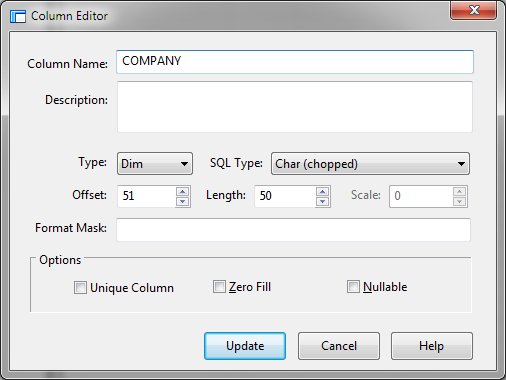
Supply the required values and click Add. While adding columns, the dialog will remain active allowing multiple columns to be entered. Click Close when column addition is complete.
Column Deletion
To remove a column from a file, select the column in the columns panel and click "Delete" from the Columns or shortcut menu.


 |