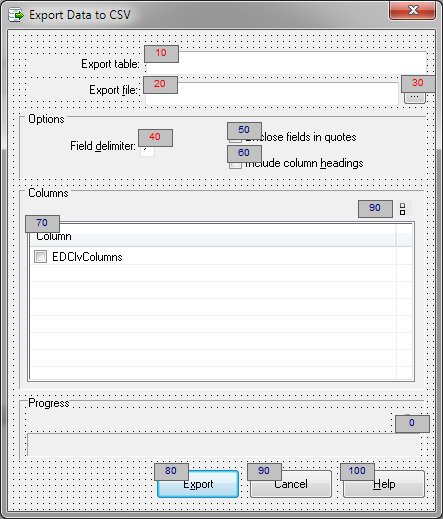
Start ZOrder Numbering (Tools menu)
Allows the user to interactively number each control's ZOrder property.
To begin the ZOrder numbering process, select "Start ZOrder Numbering". Upon initial entry, the objects are shown with the ZOrder number in blue. Simply click on the objects in the order they should be numbered. As new numbers are assigned, they are displayed in red. Double clicking an object will restart the numbering sequence. Right clicking will set the ZOrder to the current value without incrementing.
The number sequence is controlled by settings on the Ordering panel of the Options dialog. By default numbers are assigned starting at ten (10) and in increments of ten. Once all objects have been numbered, select "Stop ZOrder Numbering" from the Tools or shortcut menu.


 |