Imagelist Image Editor
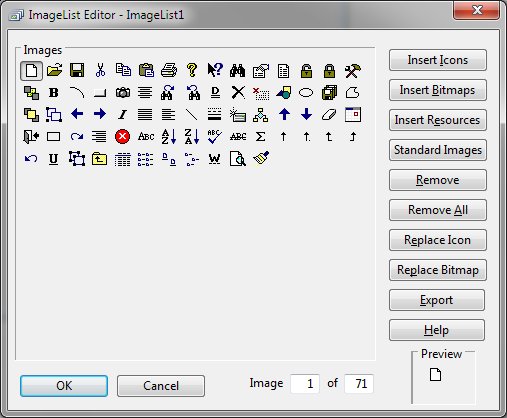
The ImageList Image Editor allows maintenance of a set of images within an imagelist. The editor consists
of a display of the current images, eleven buttons, and an image preview.
-
Image Display
-
The image set display of the editor shows any defined images. A display at the lower right of the editor
shows the image's numerical position within the list and a preview of the selected image. The selected
item is previewed by clicking the desired image in the display.
-
OK
-
The OK button signals that modifications to the imagelist are complete and the imagelist is updated.
The editor is then closed.
-
Cancel
-
The Cancel button indicates that any modifications to the imagelist should be discarded and the editor
closed.
-
Insert Icons
-
The Insert Icons button adds a new icon into the imagelist. Upon selecting this function, an open file
dialog is displayed and the user may select one or more icons to be added.
-
Insert Bitmaps
-
The Insert Bitmaps button adds a new bitmaps into the imagelist. Upon selecting this function, an open
file dialog is displayed and the user may select one or more bitmaps to be added.
-
Insert Resources
-
The Insert Resources button adds previously defined icon and bitmaps into the imagelist. Upon selecting
this function, an dialog is displayed and the user may select one or more icons oe bitmaps to be added.
The form resources are maintained using the Designer's Resource editor (Tools/Resources).
-
Standard Images
-
The Standard Images button adds the internally defined icons to the imagelist. This function is typically
not needed since each imagelist contains this set of built-in images. But selecting this function, displays
the standard image and the user may then add or remove images as desired.
-
Remove
-
The Remove button deletes the selected image from the imagelist.
-
Remove All
-
The Remove All button allows deletes all images in the imagelist.
-
Replace Icon
-
The Replace Icon button allows the selected image to be replaced with another icon.
-
Replace Bitmap
-
The Replace Bitmap button allows the selected image to be replaced with another bitmap.
-
Export
-
The Export button stores all the images in a single file.
-
Help
-
The Help button displays this page in a new window.


