 New Button
New (File menu)
Creates a new form or PrintPage inclusion file. Once selected, a dialog is displayed that allows the creation of a blank new form, a form from an existing template, or a PrintPage. To open an existing form or inclusion file, use the Open Form command.
To quickly create a blank new form, use the control N key sequence or click the New button on the toolbar and select New Form.
New Button
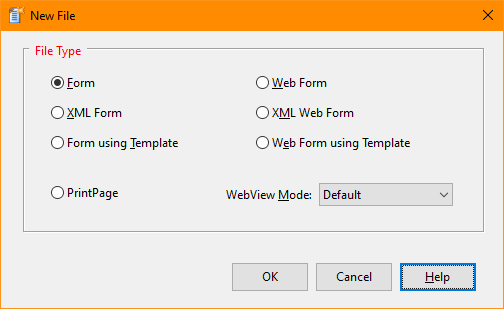
When creating a new form, the form is created in a default location using the default size. To modify the default location and size, first move and size the form as desired. Next, select Options from the Tool menu. Within the Options window, select the Form Defaults category and check "Use selected form's size and position as default". Upon clicking OK, the default values will be stored.
To quickly create a new form using a template, use the control N key sequence or click the New button on the toolbar and select Form using Template.
When creating a form from a template, all attributes of the stored templates are applied to the new form. Upon selection, this function will open a dialog and allow selection of a previously stored template. Templates are standard form files with a "tpl" extension. To create a template, create a new form. Set properties and add controls as desired. Save the form with a "tpl" extension.
To quickly create a new PrintPage inclusion file, use the control N key sequence or click the New button on the toolbar and select PrintPage.
See also: Opening and Saving Forms and PrintPages


 |