Replace (Edit menu)
Searches for and replaces specified text in the active code window.
To quickly replace text in the code window, use the control R key sequence.
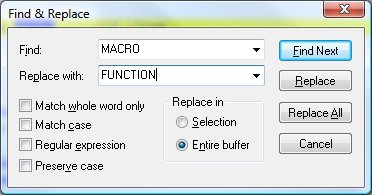
Replace Dialog Items
-
Find What
-
Type or insert the information you want to find.
-
Replace With
-
Type the text you want to use as replacement text, or paste it from the Clipboard. To delete the text
in the Find What box from the source, leave the Replace With box empty.
-
Match Case
-
Finds only those occurrences with the exact combination of uppercase and lowercase letters specified in
the Find What box.
-
Match Whole Words Only
-
Finds occurrences that are words, and not part of a larger word.
-
Find Next
-
Finds and selects the next occurrence of the text or formatting specified in the Find What box.
-
Replace
-
Changes the selected text or formatting to the text or formatting in the Replace With box, and then finds
the next occurrence.
-
Replace All
-
Finds and replaces all occurrences of the text or formatting in the Find What box with the text or formatting
in the Replace With box.
See also: Find,
Using the Editor


