Find (Edit menu)
Searches for specified text in the code window.
To quickly locate text in the code window, click the Find button on the toolbar or use the control F key
sequence.
 Find Button
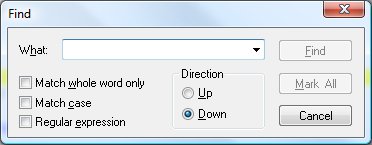
Find Dialog Items
-
Find What
-
Type or insert the information you want to find.
-
Match Whole Words Only
-
Finds occurrences that are words, and not part of a larger word.
-
Match Case
-
Finds only those occurrences with the exact combination of uppercase and lowercase letters specified in
the Find What box.
-
Regular Expression
-
Allows definition of a regular expressed in the Find What box.
-
Direction
-
Allows designation of the search direction.
-
Find
-
Initiates the search.
-
Mark All
-
Places bookmarks on all matching lines.
-
Cancel
-
Closes the find dialog.
See also: Replace,
Using the Editor


