Options (Tools Menu)
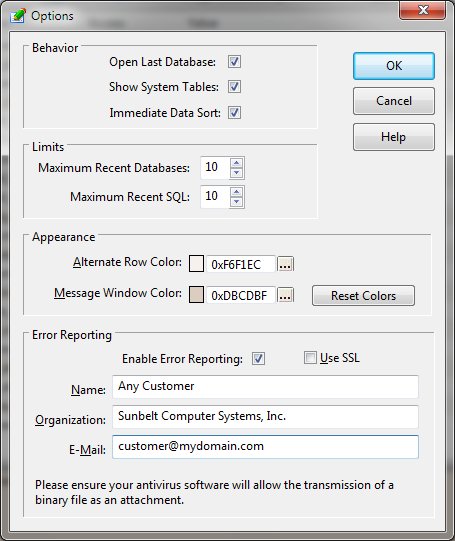
The Options function modifies the DBExplorer settings that control the appearance and behavior of the
program.
-
Open Last Database
-
Selection of this option will cause the database last accessed with the DBExplorer program to be automatically
opened when the program begins.
-
Show System Tables
-
By default, the DBExplorer hides any table that has a name beginning with "sqlite_". These
names are commonly used by SQLite to store database schema information and are not normally of interest
to the database user. Checking this item will cause the system tables to be displayed and accessible
just as a user defined table.
-
Immediate Data Sort
-
By default, the DBExplorer will sort items on the Data page immediatly upon clicking the column header.
When working with large datasets and multiple sort specifications, this may result in a slow response.
By clearing this option, the user can define the sort columns and sequences and the data will only be
sorted after clicking the Apply button.
-
Maximum Recent Databases
-
This option controls the count of the file names kept for each database accessed by the DBExplorer.
-
Maximum Recent SQL
-
This option controls the count of the file names kept for each SQL file accessed by the DBExplorer's SQL
page.
-
Alternate Row Color
-
This option allows the user to modify the alternate row color used on the DBExplorer's various lists.
-
Message Window Color
-
This option allows the user to modify the message window color.
-
Error Reporting
-
Should an error occur during the execution of the DBExplorer, the program can report the problem directly
to Sunbelt's support group. The information provided in this section will help identify the source of
the problem report and provide a means for you to receive a response.
-


