Import Flat File (Tables Menu)
DBExplorer can import data directly from a standard flat file. Upon selection of this function, a form
is displayed and the import specifications may be defined.
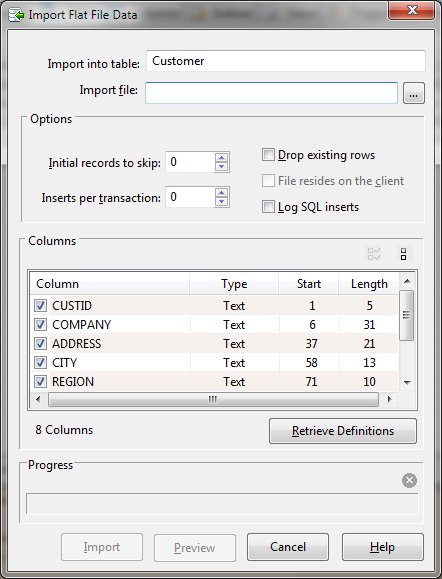
Import Dialog Items
-
Import into table
-
The name of the currently selected table that is the destination for the data imported.
-
Import file
-
The name of the flat file to be imported. A browse button is provided to allow file selection.
-
Initial records to skip
-
The number of initial records to skip during the import process.
-
Inserts per transaction
-
The database inserts are batched into a transaction during the import process for improved performance.
Adjusting this value from its default of zero (0) will decrease performance but offer some protection
in the event of a failure.
-
Drop existing rows
-
Allows any existing data to be first deleted.
-
File resides on the client
-
If running under client server, allows the import file to be opened on the client rather than the server.
-
Log SQL inserts
-
This option causes the individual insert statements to be logged to the message window. Setting this
option will degrade the performance of the import.
-
Columns
-
The name, starting position, and length of the columns to be imported. Columns may be excluded by clearing
the check box on the appropriate line.
-
Retrieve Definitions
-
Opens a window that allows PL/B source code to be pasted or loaded from a file. The source code is then
used to define the import columns.
-
Progress
-
The progress section shows the record count and a progress bar. A stop button allows the import to be
aborted.


