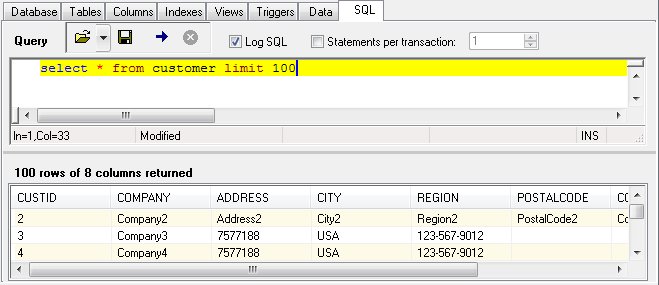
The SQL Panel
The SQL Panel allows entry and execution of SQL statements. Statements may be typed directly into the editor, pasted from the Windows clipboard, or loaded from a text file. Statements may also be saved to a text file.
This example shows a select statement typed into the query editor. After clicking the execute button (arrow), the results of the select statement are displayed. If the statement is not a select statement, the results are displayed in the message window at the bottom of the screen.
The query editor is not limited to a single statement. Multiple statements can be entered and then executed in a batch manner.
If a long list of statements are to be execution (i.e., 10,000 insert statements), performance can be significantly imported by wrapping those statements in a transaction. DBExplorer can automatically include the transaction logic. Simply enter the number of transactions per batch and click the checkbox. Optionally, you can specify a "Begin Transaction" and "End Transaction" in your statements in the query editor.
The stop button (X) halts the execution when a number of statements are entered.
The "Log SQL" option causes the statements to be displayed in the message window at the bottom of the screen as they are executed.
No column sorting is done by DBExplorer of the data returned. Column sorting may be specified using the "Order By" clause in SQL statement.
Exporting Data
To export the selected rows from a table, select the rows in the Data panel and click "Export" from the Table or shortcut menu.


 |