Obtain detailed server information
Monitor and control the clients attached to the server
Monitor the programs, text files, ISAM files, AAM files, program modules and spool files in use
Shutdown or abort clients
Monitor and adjust server logging
Assign meaningful aliases to IP address, program names, or file names
Track server usage and monitor server limits
Graphical Layout
The Watch presents information using a hierarchial tree structure on the left side of the screen and a tabbed dialog of categorized information on the right. Upon connecting to a server, the connected clients are shown in the hierarchial tree.
The example below shows a server and its active connections:
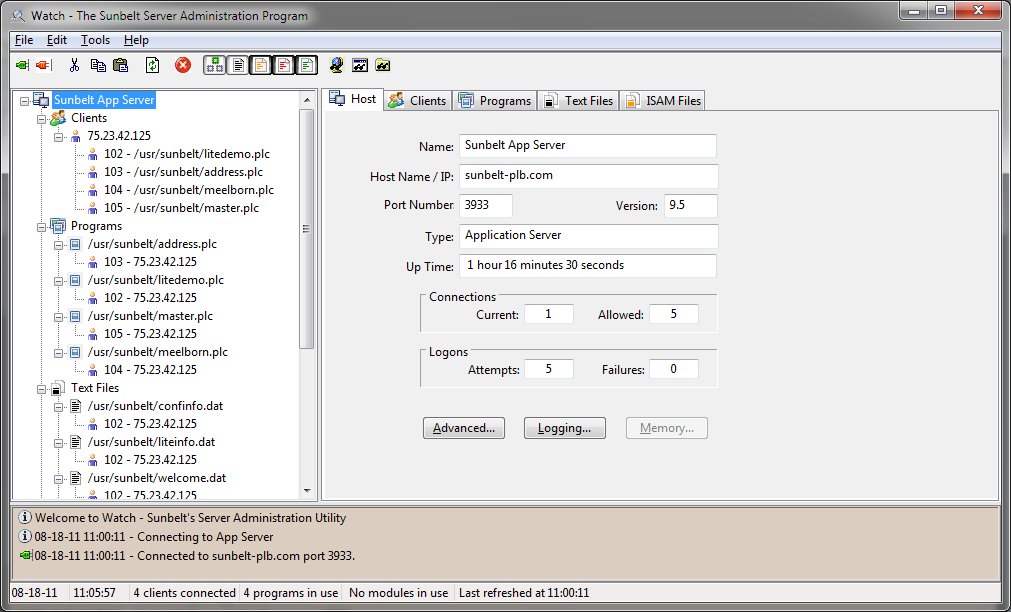
The panel on the left is the hierarchial display of the current connections. The right panel shows the tabbed dialog with pages for the host, clients, programs, modules, text files, ISAM files, AAM files, and Spool files. The bottom panel displays informational messages. Each panel may be sized by selecting the splitter between the panels and moving in the desired direction.
Across the top, a menu provides access to many of the Watch program's functions. A toolbar beneath the menu allows quick selection of frequently used menu functions. Many menu functions also have a quick select key specification. The quick select keys are shown to the right of the item within the menu.
Also available are shortcut menus. These menus are shown when the right mouse is clicked on a tree or panel item.
And finally, program help is available either by clicking the F1 key or by using one of the designated Help buttons on the various input forms.