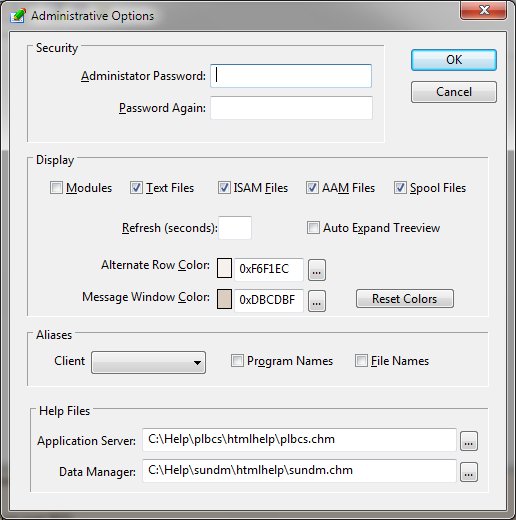
Options (Tools Menu)
The Options function modifies the Watch settings that control the appearance and behavior of the program.
Administrator Password
Specification of a password controls access to the Watch program. Upon initialization, the password must be entered correctly for the program to execute.
Modules
Controls the display of the program modules panel.
Text Files
Controls the display of the program text files panel.
Isam Files
Controls the display of the program ISAM files panel.
AAM Files
Controls the display of the program AAM files panel.
Spool Files
Controls the display of the program spool file panel.
Refresh
Defines the number of seconds after which the Watch display will be automatically refreshed. If no value is specified, no automatic refreshing is done. The user can always refresh the data manually by selecting Refresh from the Tools menu or by clicking the refresh toolbar button.
Auto Expand Treeview
Instructs the Watch utility to automatically expand all treeview entries when the data is refreshed.
Alternate row color
Defines the alternate row color used in the various lists presented by the program.
Message Window Color
This option allows the user to modify the message window color.
Reset Colors
Clicking this button restores the Alternate Row Color and Message Window Color to their default values.
Help Files
Defines the name and location of the Application Server and Data Manager help files.