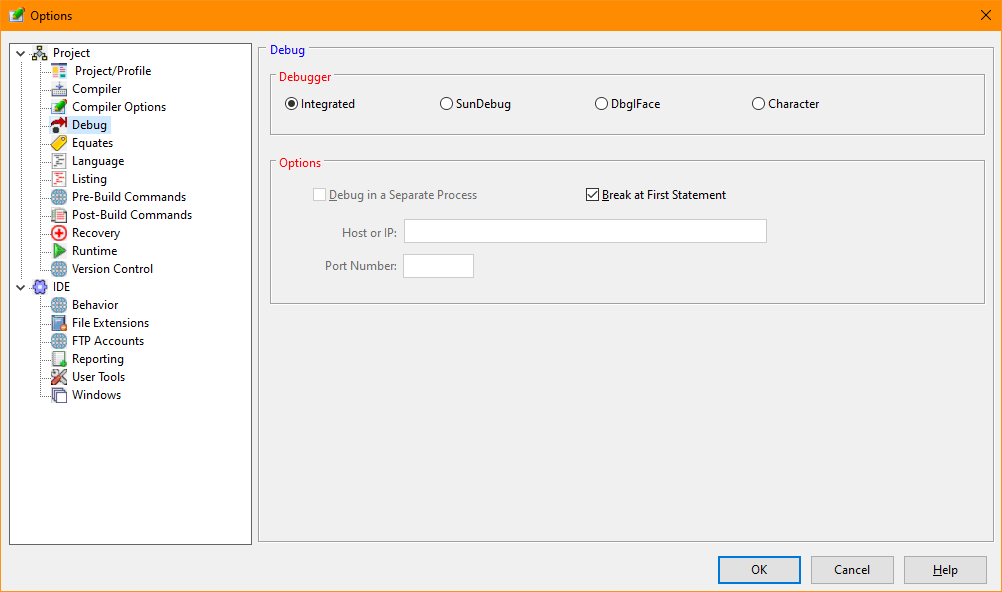
Debug (Tools/Options)
The Debug Tab of the Options dialog selects the debugger and debugger options used by the IDE.
Debug Options Dialog
Select the debugger used by the IDE.
Instructs the IDE to began a separate instance of the PL/B runtime to execute the debugger. By default, the debugger is executed as a load module. This option only applies to the Dbgiface debugger.
Instructs the Integrated or SunDebug debuggers to break the execution at the first executable statement. When this option is clear, the program will execute normally until a debugger Break command is issued or DEBUG statement is encountered during execution.
When using the SunDebug program, the IP address of the computer executing the program to be debugged may be specified. By default, the program is assumed to be running on the local host (127.0.0.1).
When using the SunDebug program, the port number of the computer executing the program to be debugged may be specified. By default, the program is assumed to be listening on port 52201.


 |