New Project (File Menu)
Creates a new project. To open an existing project, use the Open
Project command.
To quickly create a new project, click the New button on the IDE's main toolbar and select "New Project".
 New button
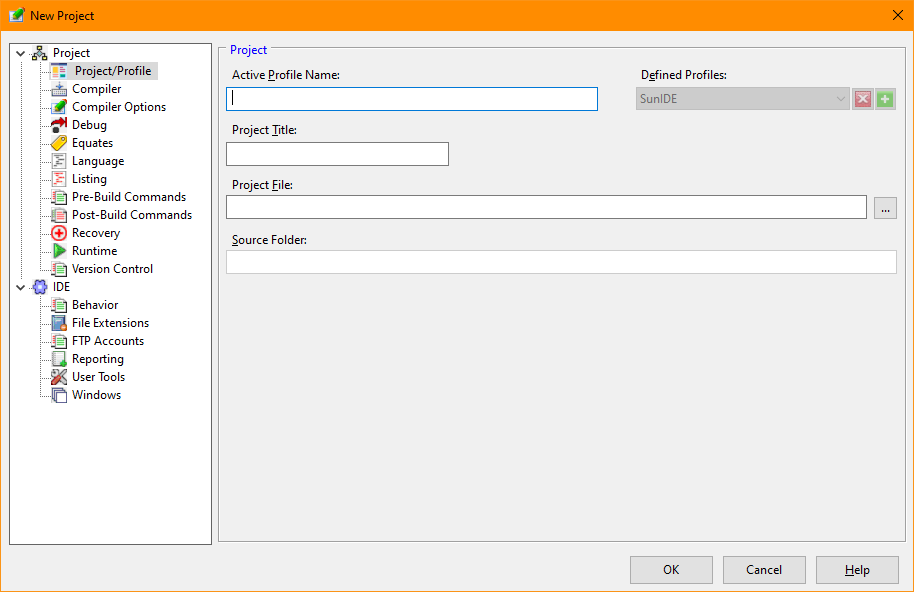
New Project Dialog Items
-
Active Profile Name
-
Enter the name of the new project.
-
Project Title
-
Enter a descriptive title for the project. The title is shown at the top of the project window.
-
Project File
-
Enter the name and location of the project file. The default extension is "prj".
-
Source Folder
-
The source folder is the directory containing the project file and serves as the default directory when
creating or adding source files.
-
Defined Profiles
-
This area allows creating, removing, and selection of the Active Profile. Profiles allow the user to
control the behavior of the IDE for different purposes. For examine, one profile may be tailored for
development and debugging and another may define the settings for a release candidate. The Active Profile
is modifed using the various Project tabs in the Options dialog.
-
-
When multiple profiles exist, the Active Profile may be changed using either this option screen or a selection
box in the main toolbar of the IDE.
See also: Close
Project, Working
with Projects


