Add / Edit (SQLIO Columns Menu)
The Add function of the Columns Menu creates a new column definition for the selected file.
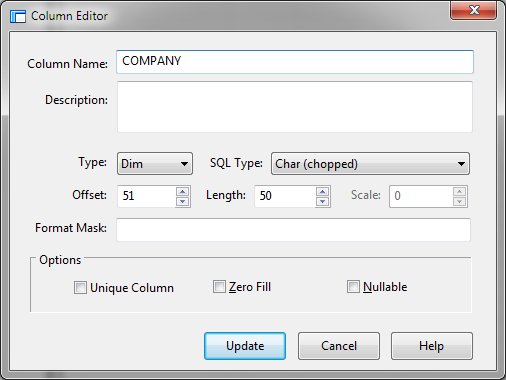
Column Editor Dialog Items
-
Column Name
Defines the name of the column.
-
Description
-
Provides a description of the database entry.
-
Type
-
Defines the fields PL/B data type.
-
SQL Type
-
Defines the fields SQL data type.
-
Offset
-
Defines the starting position of the field within the record.
-
Length
-
Defines the length of the field.
-
Scale
-
Defines the number of decimal places in a numeric field.
-
Format Mask
-
Reserved for future use.
-
Unique Column
-
Identifies the column as having a distinct value.
-
Zero Fill
-
Indicates that the numeric column should be zero filled.
-
Nullable
-
Allows the column to contain a null value.


