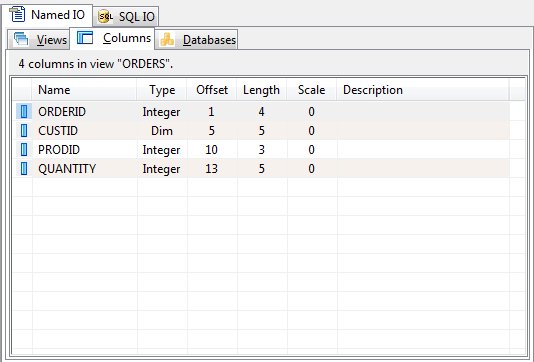
The Columns Panel (Named IO)
The required 'sun_columns' table within a Named IO schema database defines the column information for a PLB data file record. The view 'id' from the 'sun_views' table uniquely ties each column to a view. The following column names are defined in the 'sun_columns' table:
|
Column |
Use |
|
id |
This column is a unique number that identifies this column that defines the parameters to access/use a field in a view record layout. This 'id' value is used by a PLB runtime to process the data for this view record field. The id column is a pseudo column whose value is a unique number assigned by the SQLite database engine when a row is inserted into a table. The id column can not be changed by an end-user. The SQL data type for this column is 'integer primary key'. |
|
view_id |
This column is the same as the 'id' found in the 'sun_views' table. This column associates a specific view name to this column definition that has been inserted into the 'sun_columns' table. The SQL data type for this column is 'integer'. |
|
name |
This column contains a name for this column. The column name can be specified in PLB IO instructions (READ, WRITE, and UPDATE). In addition, this column name can be specified in a filter expression that is assigned using the FILTER instruction. This column name is not case sensitive. The runtime uses this column name to process column field parameters as defined in 'sun_columns' table. The SQL data type for this column is 'text not null'. |
|
description |
This column contains text that describes the schema database column that has been specified. The SQL data type for this column is 'text'. |
|
type |
This column is a number that gives the basic PLB data type of this column field definition. The SQL data type for this column is 'integer'. The acceptable values for this column are as follows 0 - DIM variable 1 - FORM variable 2 - INTEGER variable |
|
offset |
This column is a number that gives the one relative offset in a record where the field is located. The SQL data type for this column is 'integer'. |
|
length |
This column is a number that gives the length for the field in a record. This value is the total length of the field. In the case of a FORM variable, the total length includes the whole digits, a decimal point if used, and the decimal digits to the right a decimal point if used. The SQL data type for this column is 'integer'. |
|
scale |
This column is a number that gives the number of decimal digits to the right of a decimal in a FORM variable. If this value is '-1', the FORM is to have a decimal point with no fractional digits. Otherwise, this value can be from zero to the maximum number of fractional digits allowed for a PLB FORM variable. The SQL data type for this column is 'integer'. |
|
element_count |
This column is a number that gives the number sequential fields assigned to this PLB field definition. The default number is one (1). This number corresponds to the number of variables declared for a PLB array. The SQL data type for this column is 'integer'. |
|
sql_type |
Required for ODBC driver to be implemented at a later time. The SQL data type for this column is 'integer'. |
|
key_value |
Required for ODBC driver to be implemented at a later time. The SQL data type for this column is 'integer'. |
|
nullable |
This column is a number that defines whether the PLB field can be null or not. If the nullable value is zero, the PLB field must be included in a WRITE instruction or the schema default specification for the PLB field must be defined. If the nullable value is non-zero, the PLB field does not have to be included in a WRITE instruction. The SQL data type for this column is 'integer'. |
|
zero_fill |
Required for ODBC driver to be implemented at a later time. The SQL data type for this column is 'integer'. |
|
empty_null |
Required for ODBC driver to be implemented at a later time. The SQL data type for this column is 'integer'. |
|
selectivity |
Required for ODBC driver to be implemented at a later time. The SQL data type for this column is 'integer'. |
|
format_mask |
Required for ODBC driver to be implemented at a later time. The SQL data type for this column is 'integer'. |
|
default_value |
This column is intended to contain a default value that is to be written when column names are being used in a WRITE instruction and the PLB column name for this field is not included in the PLB variable list. If the 'default_value' is empty, blanks or zeros are written as a default depending on the PLB variable type. Otherwise the 'default_value' data is written. The SQL data type for this column is 'text'. |
The columns panel show each column's name, type, size, starting offset, length, scale and description.
Column Addition or Edit
To add or edit a column, choose "Add" or "Edit" from the Columns menu or from the shortcut menu. The column editor will be displayed.
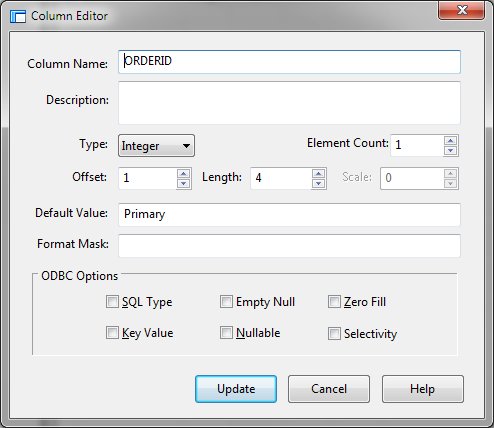
Supply the required values and click Add. While adding columns, the dialog will remain active allowing multiple columns to be entered. Click Close when column addition is complete.
Column Deletion
To remove a column from a view, select the column in the columns panel and click "Delete" from the Columns or shortcut menu.


 |