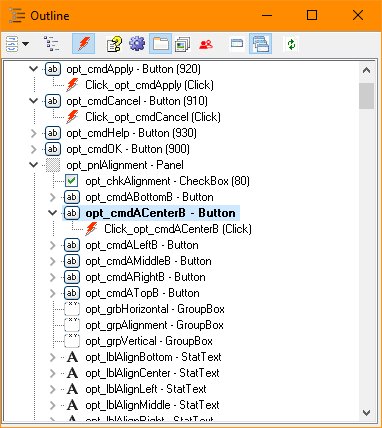
Outline (Window Menu)
Use the Outline to access objects associated with a form including those that have no visual representation such as timers and imagelists. The Outline also shows the type of objects and optionally their help id, object id, tab id, zorder, or group id value. Any event registed to an object may be displayed and objects having subitems may show those items
Outline Window
When the Integrated Layout of the Designer is in use, the Outline is shown in a tabbed dialog on the left or right side of the screen.
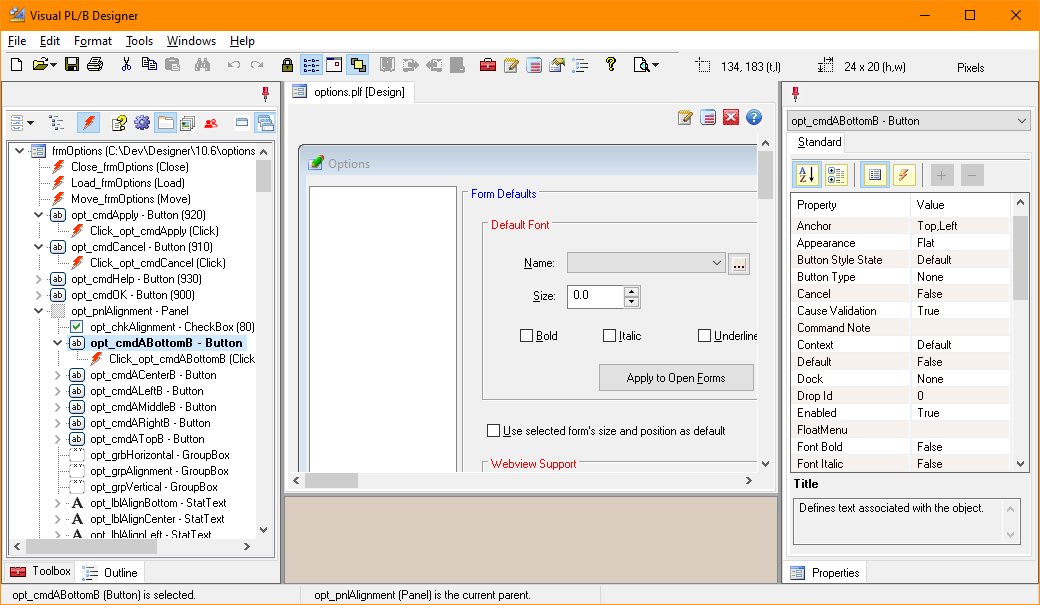
Items are arranged in the outline by the parent form or control and then alphabetically. By clicking on an object within the outline, its properties may be accessed via the Properties Window. Alternately, you may right click on an object and select "Properties". To edit object code, right click the object and choose "Code" or double click on the event line.
The outline supports three forms of display selectable by using the first dropdown button on the window's toolbar:
The Subitem Display toggle button controls the display of an objects subitems. Objects such as menus serve as the parent for menu items. Likewise, listviews have attributes and columns, toolbars have buttons, and statusbars have statuspanels.
The Events Display toggle button controls the display of object events. The display shows the event label and name.
Two types of numbering can be show by the object tree:
The Form control buttons allows display of only the currently selected form or all forms open.
The Refresh button will empty the outline and update all information shown in the window.


 |