Verify Event Registrations
The Validate Event Registrations function performs a diagnostic test of selected form files (.PLF).
Upon selection of the function, the following dialog appears:
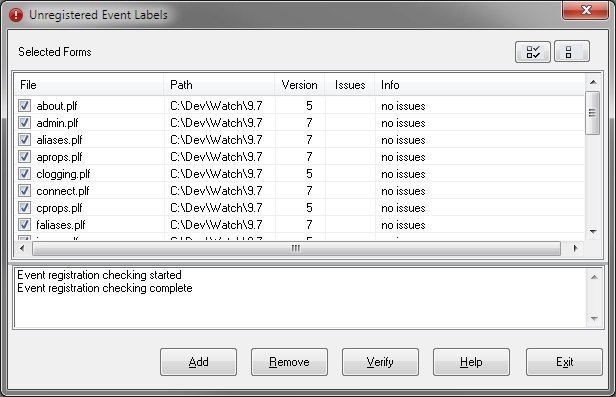
The upper portion of the dialog will contain a list of files to be examined. The lower portion will display
any issues encountered and other informative messages.
-
Selected Forms
-
The list in the upper section of the dialog show the selected files. Double-clicking a form name will
open the form in the Designer's main program.
-
Add
-
The Add button opens a common dialog that allows file selections. All files selected are added to the
Selected Forms section of the dialog.
-
Remove
-
The Remove button deletes files from the Selected Forms list. Only the checked items are removed.
-
Verify
-
The Verify button begins the checking process described below. Only the checked items are verified.
-
Help
-
The Help button displays this page in a new window.
-
Exit
-
The Exit button closes the dialog.
-
-
The verification process iterates through the source code of the form searching for event labels. These
labels are in the form <event>_<object>. Upon finding a valid event label, the object is
checked to insure the event label is registered to the event. If it is not registered, a message is displayed
in the lower portion of the screen. The total number of issues are shown on the form's line in the upper
section.
-
-
Note that this is a simple check and if an issue is reported it does not mean there is an error. The
event routine may have been intentionally unregistered by the programmer and the code left in the code
section. An event routine may also be registered to another object or event. Neither of these occurences
are considered errors.
-
|
 |
|