DataTable Data Editor
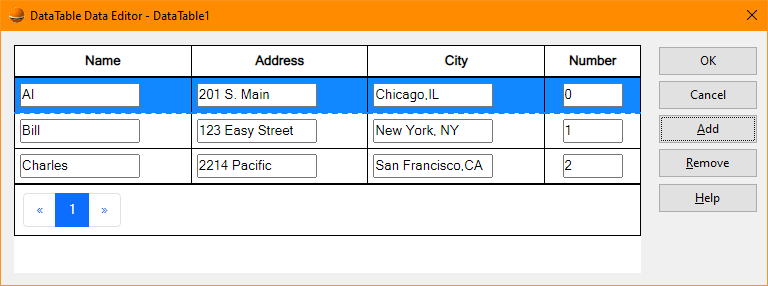
The DataTable Data Editor allows maintenance of data within a datatable. The editor consists of a listview
with editable data and five buttons.
-
OK
-
The OK button signals that modifications to the datatable data is complete and the datatable is updated.
The editor is then closed.
-
Cancel
-
The Cancel button indicates that any modifications to the datatable should be discarded and the editor
closed.
-
Add
-
The Add button inserts a new row into the datatable beneath the selected row. The column name defaults
to Row{nn} where {nn} is a sequential value.
-
Remove
-
The Remove button deletes the selected row from the datatable.
-
Help
-
The Help button displays this page in a new window.
-
