DataTable Column Editor
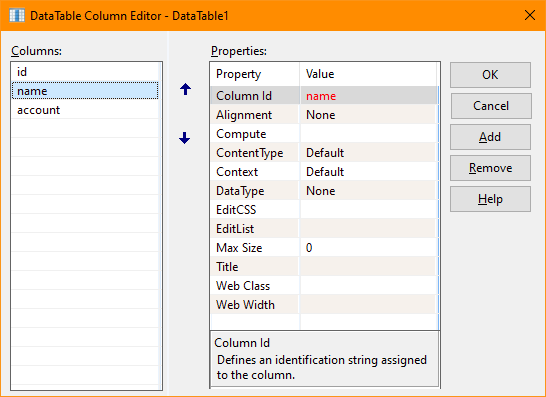
The DataTable Column Editor allows maintenance of columns within a datatable. The editor consists of
two lists and five buttons.
The edit window may be resized and a splitter is available to allow resizing the columns list.
-
Columns
-
The list on the left side of the editor shows any defined columns. The list on right shows the selected
column's properties. The selected column is highlighted and may be changed by clicking the desired column.
-
OK
-
The OK button signals that modifications to the datatable columns are complete and the datatable is updated.
The editor is then closed.
-
Cancel
-
The Cancel button indicates that any modifications to the datatable should be discarded and the editor
closed.
-
Add
-
The Add button inserts a new column into the datatable. The column name defaults to Column{nn} where
{nn} is a sequential value.
-
Remove
-
The Remove button deletes the selected column from the datatable.
-
Help
-
The Help button displays this page in a new window.
-
Up and Down
-
The Up and Down Arrow buttons located between the two lists of the editor allows changing the position
of the selected column.
