Export CSV File (Tables Menu)
DBExplorer can export data to a delimited or CSV file. Upon selection of this function, a form is displayed
and the export specifications may be defined.
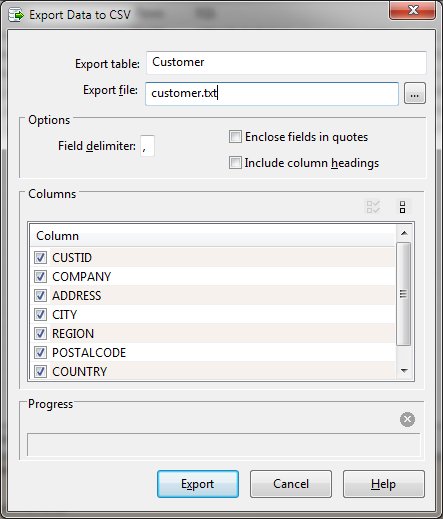
Export Dialog Items
-
Export table
-
The name of the currently selected table that is to be exported.
-
Export file
-
The name of the destination file. A browse button is provided to allow file selection.
-
Field delimiter
-
A single character that denotes the end of a field within each record.
-
Enclose fields in quotes
-
Specifies that each file should be wrapped with an opening and close double quote (") character.
-
Include column headings
-
Indicates that the first record should contain the column headings.
-
Columns
-
The name of the columns to be exported. Columns may be excluded by clearing the check box on the appropriate
line.
-
Progress
-
The progress section shows the record count and a progress bar. A stop button allows the export to be
aborted.
-
When exporting from the Data or SQL tab, only the selected rows are output. Use Select All before exporting
to choose all rows of data shown. The Export Data function when other DBExplorer tabs are selected exports
all rows in the selected table.


