Add or Edit (Indexes Menu)
The Add function of the Indexes Menu creates a new index on the selected table. Tables may have any number
of indexes. The Edit function of the Index Menu uses the same Index Editor.
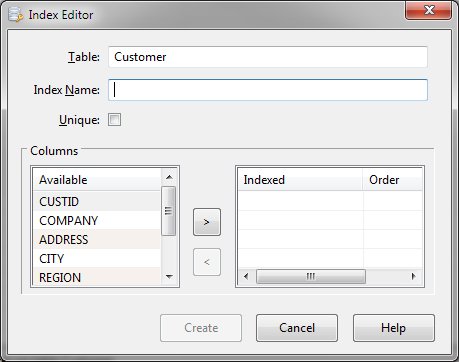
Index Editor Dialog Items
-
Table Name
-
Shows the currently selected table to which the index will be added.
-
Index Name
-
Defines the name of the index to be created or being edited. This name must be unique.
-
Unique
-
Specifies that the index values must be unique.
-
Available Columns
-
Shows a list of existing column definitions.
-
Indexed Columns
-
Shows a list of selected columns and whether the values are to be in ascending or descending order. Clicking
on the order value allows selection between ascending and descending.
-
>
-
Allows the selected available column to be added to the indexed column list.
-
<
-
Removes the selected indexed column and places it back in the available column list.
-
Create or Update
-
Creates or updates the defined index.
-
Cancel
-
Aborts the index creation or modification process and returns to the program.


