Add or Edit (Columns Menu)
Clicking the Add or Edit column menu item will display the Column Editor.
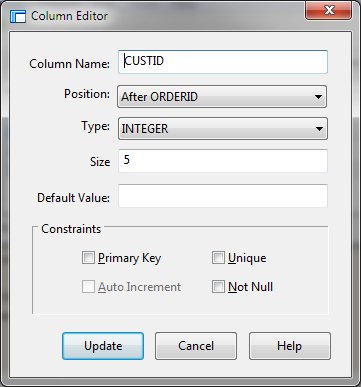
Column Editor Dialog Items
-
Column Name
-
Specifies the unique name of the column
-
Position
-
Defines the position of the column within the table.
-
Column Type
-
Allows selection of a column type. SQLite uses dynamic typing. The column type does not restrict what
data may be put in the column
-
Size
-
Allows specification of the column length.
-
Default Value
-
Specifies a default value to use when doing an INSERT. The value may be NULL, a string constant, a number,
or a constant expression enclosed in parentheses. The default value may also be one of the special case-independant
keywords CURRENT_TIME, CURRENT_DATE or CURRENT_TIMESTAMP. If the value is NULL, a string constant or
number, it is inserted into the column whenever an INSERT statement that does not specify a value for
the column is executed. If the value is CURRENT_TIME, CURRENT_DATE or CURRENT_TIMESTAMP, the current
UTC date and/or time is inserted into the columns. For CURRENT_TIME, the format is HH:MM:SS. For CURRENT_DATE,
YYYY-MM-DD. The format for CURRENT_TIMESTAMP is "YYYY-MM-DD HH:MM:SS".
-
Primary Key
-
Normally creates a UNIQUE index on the column or columns that are specified as the PRIMARY KEY. The only
exception to this behavior is special INTEGER PRIMARY KEY column. According to the SQL standard, PRIMARY
KEY should imply NOT NULL. Unfortunately, due to a long-standing coding oversight, this is not the case
in SQLite. SQLite allows NULL values in a PRIMARY KEY column. We could change SQLite to conform to the
standard (and we might do so in the future), but by the time the oversight was discovered, SQLite was
in such wide use that we feared breaking legacy code if we fixed the problem. So for now we have chosen
to continue allowing NULLs in PRIMARY KEY columns. Developers should be aware, however, that we may change
SQLite to conform to the SQL standard in future and should design new programs accordingly.
-
Auto Increment
-
An INTEGER PRIMARY KEY column can also include the keyword AUTOINCREMENT. The AUTOINCREMENT keyword modifies
the way that B-Tree keys are automatically generated. If you declare a column of a table to be INTEGER
PRIMARY KEY, then whenever you insert a NULL into that column of the table, the NULL is automatically
converted into an integer which is one greater than the largest value of that column over all other rows
in the table, or 1 if the table is empty.
-
Unique
-
Causes an unique index to be created on the specified columns. All NULL values are considered different
from each other and from all other values for the purpose of determining uniqueness, hence a UNIQUE column
may contain multiple entries with the value of NULL.
-
Not Null
-
Specifies that the column must require a value.
-
Add or Update
-
Adds or updates the defined column.
-
Cancel
-
Aborts the column editing process and returns to the program.


